
Free · runs in your browser

Night video enhancer

Make after-dark footage watchable without turning night into day: lights stay intact, the sky stays dark and low-light grain is smoothed. Free and private.

Drop a dark video to brightenChoose a dark video

Or pick one from your computer. You’ll see it brightened before you save anything.Pick the clip that came out too dark from your photos or files.

Works with MP4MOVWebMMKVand more

Brightened on your device. The file is never uploaded.

For footage shot after dark, open it above and press Night video. It lifts the scene in linear light, protects street lamps, headlights and signs with Highlights, keeps a black sky black with Blacks, and adds Noise reduction for the grain that low light always brings. Use Strength to decide how bright “night” should be, and Before and after to keep yourself honest.

The aim is a picture you can see into, not a fake daylight shot. Night scenes have deep shadows, small bright points and warm, saturated colour; push them to a daytime brightness and they turn grey, noisy and strange. This page explains what happens to night footage when you brighten it, and how to get the most out of a clip from a phone or a camera.
How to brighten a night video

  1. Open the night clip

    Choose Select video or drop the file in. The preview starts playing straight away.

  2. Press Night video

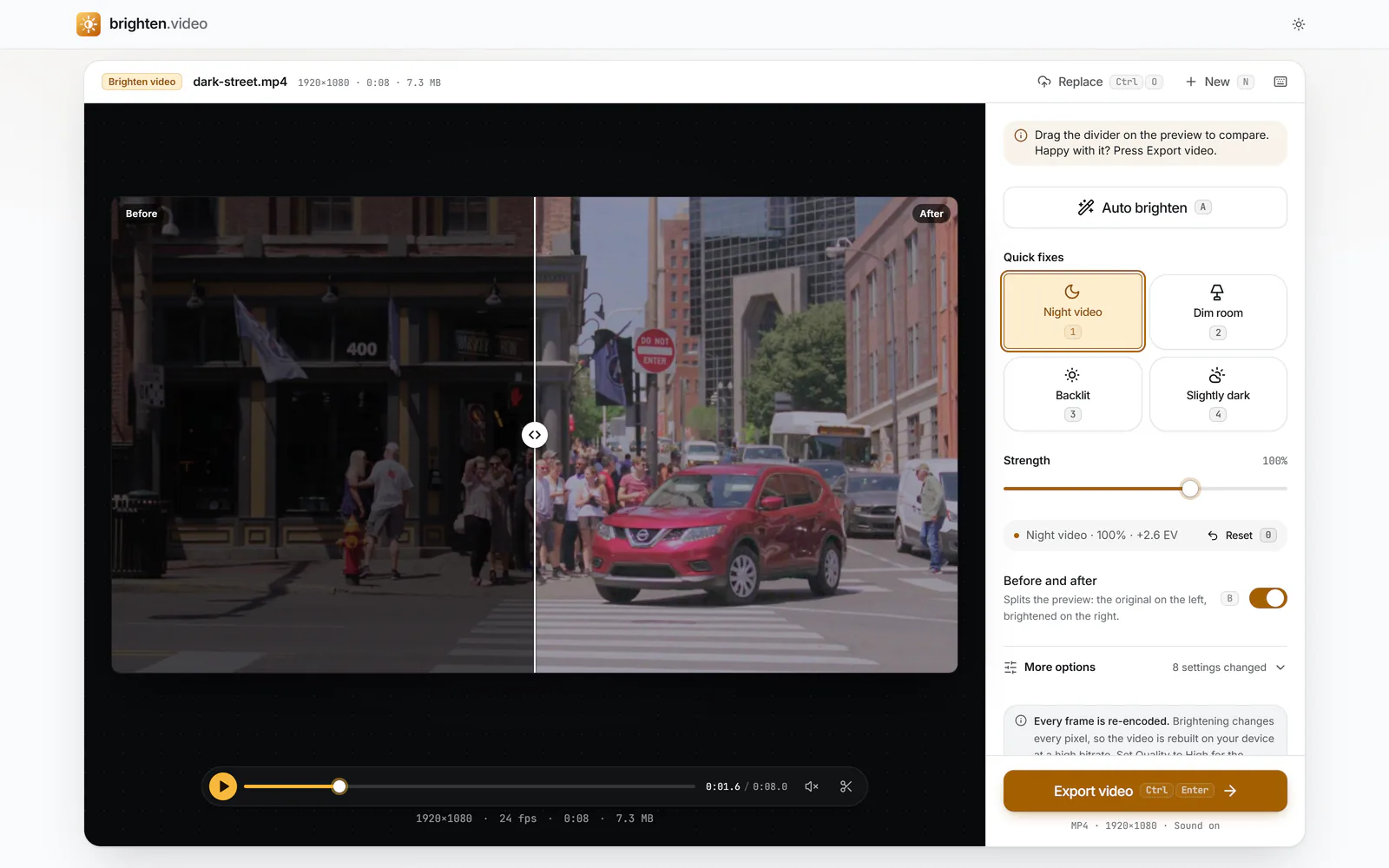
    Under Quick fixes, press Night video (or 1). It measures the clip and picks an exposure that keeps the scene recognisably night-time.

    The editor with the Night video quick fix selected and Before and after on: the dark original on the left of the preview, the lifted version on the right. The status reads "Night video · 100% · +2.6 EV" and Strength is at 100% (enlarge image)

    Press Night video (1), then use Strength and the Before and after split to judge how bright night should look.

    1. Night video (1)
    2. Strength
    3. Before and after (B)
  3. Set the strength

    Drag Strength down if it looks too much like daytime, or up to 150% for very dark footage. Press B for the before and after split.

  4. Clean up the grain

    If the dark areas look speckled, open More options and raise Noise reduction. Moving Blacks to the left also hides murky noise in the deepest shadows.

  5. Export

    Select Export video, then Download video or Share. Set Quality to High under Export settings for footage with lots of fine grain.

What makes night footage hard

At night most of the frame is deep shadow, and a few points (lamps, windows, car lights, a phone screen) are thousands of times brighter. A camera sensor can’t record both well in one exposure. Phones usually protect the bright points and let the rest fall into the bottom of the range, then raise their internal gain to compensate, which adds noise. Compression then saves space by smoothing away the faint detail that remains in the darkest areas.

Brightening reverses part of that. The faint detail comes back up into view, and so does everything else that was hiding down there. That is why the Night video fix combines a measured exposure lift with highlight protection, a firm black point and noise reduction, rather than one big brightness boost.

Keep the lights from blowing out

Street lamps and headlights are often already at or near white in the original. A plain brightness boost turns their glow into large flat blobs. Here, exposure is applied with a smooth highlight shoulder, so values approaching white are bent into it gradually, and Highlights is pulled down further on top of that. If signs or windows still look washed out, open More options and lower Highlights more.

Grain, banding and colour at night

Grain

Low-light grain comes in two flavours: fine brightness speckle, which can look film-like and is often fine to keep, and blotchy colour noise, which looks digital and cheap. Noise reduction here works hardest on the colour noise and only in the darker parts of the frame, and it respects edges so outlines and text stay sharp.

Banding

A dark sky in an 8-bit video may use only a handful of levels. Stretch it and you can see the steps as bands. Keeping Blacks slightly negative makes the sky a clean black instead of a stepped grey, which usually looks better than trying to rescue it.

Colour

Sodium and LED street lights give strong orange or blue casts. Lifted, they can look garish; lowering Saturation a few points calms them, while Vibrance gives muted areas some life without over-cooking the lights.

Typical night situations

  • Street and city scenes: Night video at 80-100% usually looks right. Watch that the sky doesn’t turn grey.
  • Concerts and gigs: stage lights are extremely bright; lower Strength and pull Highlights down so the performers’ faces don’t clip.
  • Fireworks: keep the sky dark. A small exposure lift and a little Vibrance is often enough.
  • Campfires and candlelight: these are warm, small light sources in big darkness; Dim room or Night video at a lower Strength keeps the mood.
  • Security and dashcam clips: brighten to see detail, but expect heavy compression artefacts. Noise reduction helps; nothing restores a number plate that was never recorded sharply.

Filming at night next time

  • Use your phone’s main (1×) camera; it has the largest sensor and widest aperture. Zoomed lenses gather much less light.
  • Lower the frame rate to 24 or 30 fps so each frame can be exposed for longer.
  • Hold still or brace against something: the camera can then use slower shutter speeds without motion blur.
  • Tap to expose on the subject, not on a lamp, and avoid pointing straight at bright lights.

Phones handle this differently; see the guides for iPhone and Android for their built-in editing tools.

Night video questions

Can you make a night video look like it was filmed in daytime?

Not convincingly. Daylight has light everywhere; night has dark shadows and small bright sources. Pushing a night clip to daytime brightness makes it grey and noisy. Night video aims for a clear, natural night look instead.

Why is my night video so grainy after brightening?

The grain was always there; the shadows were just too dark to show it. Raise Noise reduction, lower Strength a little, and move Blacks to the left so the darkest areas stay clean.

Will street lights and headlights get blown out?

Night video protects them: exposure rolls bright values gently into white, and Highlights is lowered. Lights that were already pure white in the original stay white.

Is this the same as an AI night video enhancer?

No. It doesn’t invent detail with a generative model. It applies measured exposure, tone curves and noise reduction to what the camera recorded, which keeps the result faithful and lets it run privately on your device.

How long does it take to process a night video?

The preview is immediate. Export time depends on length, resolution and your device: a minute of 1080p usually takes about that long or less on a recent laptop, and longer on a phone.

Does it work with dashcam or security camera footage?

Yes, if your browser can open the file (most are MP4). Heavily compressed footage won’t reveal detail the camera never captured, but it will become easier to see.